BlogToPin Review
BlogToPin
Nic Tech Solutions, LLC
BlogToPin Review - Overview


BlogToPin Review - What Is It?
If you have ever tried to grow a website with Pinterest, you know the routine: design a pin in Canva, write a title, write a description, add hashtags, pick a board, schedule it, then do it all again for the next page. Pinterest rewards fresh pins every day, so the work never ends. Most website owners give up after a few weeks, and the traffic they could have had never arrives.
That is the problem BlogToPin was built to solve. In this BlogToPin review I will walk you through what it does, what it costs and where it falls short, based on using it to run Pinterest for several of my own sites: a review blog, a printable coloring page store and an affiliate store.
So, what is BlogToPin?
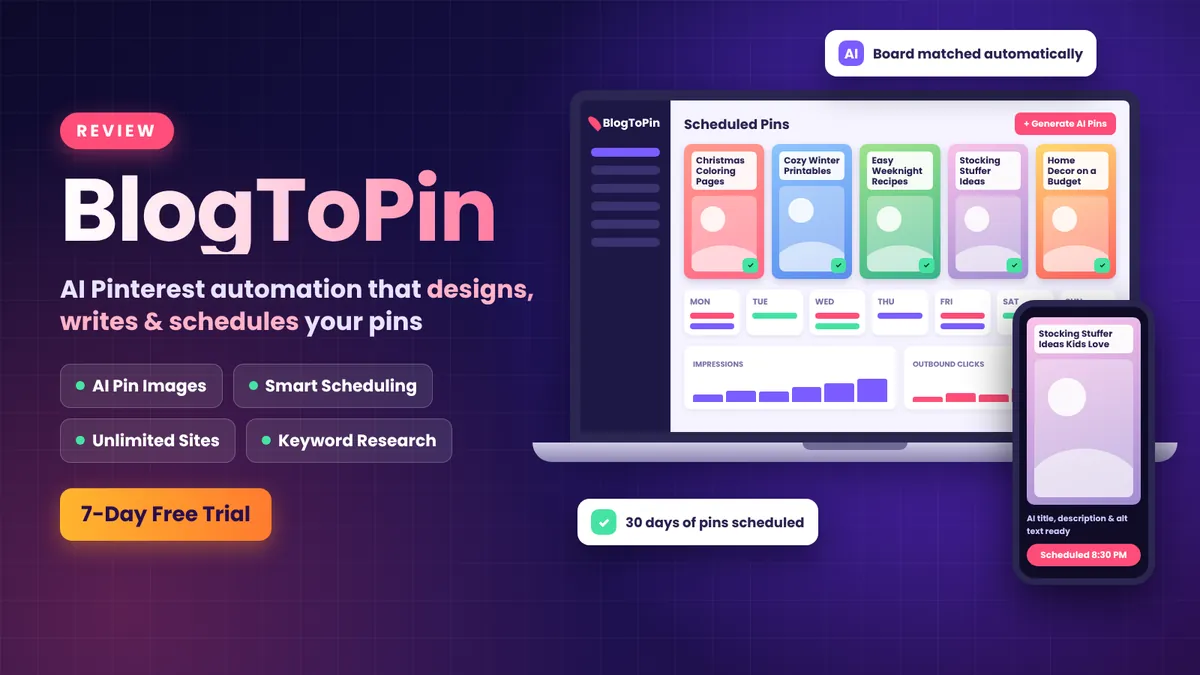
BlogToPin is a web-based SaaS tool for Pinterest automation. You log in through your browser, connect your Pinterest account and add your website. BlogToPin then reads your pages, creates pins for them, writes the titles, descriptions and alt text, chooses the right board and schedules everything for you, up to a month ahead.
It is not just a scheduler. A scheduler only posts what you already made. BlogToPin makes the pins too. It can use the images already on your pages, design new pins from templates, or create brand-new AI images in the quality you choose.
It also works without a website. You can describe a pin idea in plain words and give it any destination link, which is how I create pins that send people straight to an affiliate offer.
What do you get?
- Automatic pin creation from your website pages (WordPress, Shopify, Etsy and other platforms)
- AI-designed pin images, with a choice of image quality
- AI titles, descriptions, keywords, hashtags and alt text
- Automatic board selection and a smart posting schedule
- Built-in Pinterest keyword research
- Analytics for pins, boards and links
- Unlimited Pinterest accounts and unlimited websites on every plan
BlogToPin is a paid monthly or yearly subscription. BlogToPin offers a 7-day free trial, so you can test it on your own website before you pay. You can also create basic pins and regenerate a few AI pins for free.
About the Vendor
BlogToPin is made by Nic Tech Solutions, LLC, a US-registered company that builds the tool as its main product. Unlike many marketplace launches, BlogToPin is not a one-time WarriorPlus or JVZoo release. It is an ongoing software service with public pricing, a help section, tutorials and a set of free Pinterest tools (keyword research, title and description generator, alt text generator, board name generator and more) on its website.
The company presents BlogToPin as approved by Pinterest, which means pins are published through Pinterest’s official connection instead of risky browser tricks. The tool keeps adding features: AI image models you can choose between, posting to Facebook Pages, and a connection that lets AI assistants such as Claude manage pins for you. Team invitations are still listed as “coming soon”.
Features & Benefits
Website-to-Pin Automation
Add your website and BlogToPin scans your posts, product pages and categories. You choose which pages to promote, and it creates pins for each one with the correct link already attached.
Benefit: A whole site can be turned into a month of Pinterest content in minutes instead of days of design work.
AI Pin Images with a Quality Choice
The AI Pin feature creates fresh pin graphics with your headline on them. You can pick a premium model for the best text and detail, or a cheaper, faster model when you need volume. You can also give it one of your own product images as a reference, so the pin shows your real product instead of an invented one. Failed images are refunded to your credits.
Benefit: Professional-looking pins without Canva skills, and you control how many credits each pin uses.
AI Titles, Descriptions, Hashtags and Alt Text
Every pin gets an SEO-focused title, description, keywords and alt text written for Pinterest search. You can give the AI your own instructions, for example to add an affiliate disclosure or hashtags at the end.
Benefit: Every pin is ready for Pinterest search, which is where most long-term Pinterest traffic comes from.
Built-in Pinterest Keyword Research
BlogToPin can search Pinterest’s own “Ideas” topics and show roughly how many people searched each one. I used it to plan my Christmas pins around phrases like “cute coloring pages” and “stocking stuffers”.
Benefit: You write pins for what people actually search, not for guesses.
Smart Board Selection and Scheduling
The AI matches each pin to the most relevant board and spreads pins over the day and across your pages, so the same link is not posted too often.
Benefit: A steady, natural posting pattern that keeps your account active while you work on other things.
Review Before It Posts
Pins can wait for your approval. You can edit the title, description, board and time, approve them in bulk, or reject the ones you don’t like.
Benefit: Automation without losing control of what appears on your profile.
Multi-Site and Multi-Account
Every plan includes unlimited Pinterest accounts and unlimited websites.
Benefit: One subscription can run Pinterest for all your sites, or for clients.
How Does BlogToPin Work?
Step 1: Create Your Account and Connect Pinterest
Sign up on the BlogToPin website and connect your Pinterest account through Pinterest’s official login. You can connect more than one account if you run several brands. If you already have a Facebook Page, you can connect that too.
Step 2: Add Your Website
Enter your website address. BlogToPin scans your site and lists your pages, posts and products. You choose which pages to promote and can add a short description or keywords for each one to guide the AI. If you want to promote something that isn’t on your site, such as an affiliate offer, you can skip this step and create pins from a written prompt with your own destination link.
Step 3: Set Up Your Boards
Link the Pinterest boards you want to use. BlogToPin matches pages to the right boards automatically, and you can switch boards on or off at any time. Turning a board off stops new pins going to it without deleting anything.
Step 4: Generate Your Pins
Pick a page (or several) and choose your image quality. You can add a reference image from the page, extra image instructions, a headline for the pin and instructions for the text. About a minute later the pins are ready, each with its image, title, description, keywords and alt text.
Step 5: Check, Edit and Schedule
Look through the new pins before they go live. Edit anything that needs a human touch, fix the alt text while you still can (it can’t be changed after scheduling), then schedule them. You can let BlogToPin pick the next open time slots, or set an exact date and time for each pin, which is handy for holiday sales.
Step 6: Watch the Results and Adjust
The analytics show your impressions, clicks and best-performing pins, boards and links. Use them to decide which pages deserve more pins, and delete pins that aren’t working. Then repeat the process every week or two to keep a steady flow of fresh pins.
Who Is It For?
Bloggers
If you publish recipes, home decor, DIY, travel or any visual topic, Pinterest can send steady traffic for months after a pin goes live. BlogToPin keeps your older posts in front of new readers without you designing every pin by hand.
Online Store Owners
Shopify and Etsy sellers, and anyone selling printables or digital products, can turn every product page into pins with the right link attached. It works especially well for gift ideas and seasonal products.
Affiliate Marketers
Because you can create pins from a prompt and add any destination link, you can promote affiliate offers directly, with your disclosure and hashtags written into every description.
People Running Several Sites
Unlimited websites and Pinterest accounts make it practical to manage a whole portfolio from one dashboard. This is where BlogToPin saves me the most time.
Agencies and Freelancers
The higher plans allow far more pins per day and include priority support, so they suit people managing Pinterest for clients.
Who may not find it suitable
BlogToPin only covers Pinterest, plus posting to Facebook Pages. If you need one tool for Instagram, TikTok and other networks, you will need something else. Because there are no refunds, it’s also not for people who want to buy first and decide later. Use the 7-day free trial to test it properly before paying. Finally, if you want every single pin hand-designed, a manual tool like Canva will suit you better.
Pros
- Creates the pins, not just the schedule: images, titles, descriptions, alt text and boards
- Unlimited websites and Pinterest accounts on every plan
- Built-in Pinterest keyword research
- Choice of AI image quality, with refunds for failed images
- Works without a website, so you can promote affiliate offers directly
Cons
- No refunds, so use the 7-day free trial to test it first
- AI credits are capped each month (200 on Starter)
- AI text sometimes needs a quick human check before posting
- Alt text and pin links can’t be changed once a pin is scheduled
- Monthly billing costs more ($39 vs $25 a month billed yearly)
Why Choose It?
There are plenty of Pinterest schedulers, but most of them still expect you to bring the pins. BlogToPin does the creative work as well, and that is the main reason to choose it.
It saves hours every week
Designing, writing and scheduling a month of pins by hand can take days. With BlogToPin, that becomes a short review session where you approve or fix what the AI made.
You stay in control
Nothing has to post without your approval. You can edit the text, change boards, reject pins and set exact publishing times. That balance between automation and control is what keeps the account looking natural.
Real research is built in
Having Pinterest’s own topic data inside the tool means your pins can target searches people actually make, which matters more on Pinterest than clever design.
One plan covers all your sites
Unlimited websites and Pinterest accounts on every plan mean you don’t pay extra for each new site or brand.
Flexible AI costs
AI credits are spent at the image quality you choose, so you can save credits on everyday pins and use the premium model for your most important ones. Failed images are refunded.
Safe and official
BlogToPin is presented as approved by Pinterest and publishes through Pinterest’s official connection, which is safer for your account than tools that automate your browser.
It won’t guarantee traffic. That still depends on your niche, your content and consistency. But it removes the biggest reason most people quit Pinterest: the time it takes.
Funnel Details
BlogToPin is a subscription service with three plans. There are no upsells or one-time offers; you simply pick the plan that fits your posting volume. Every plan can be paid monthly or yearly, and yearly billing is cheaper. Every plan starts with a 7-day free trial, and you can also create basic pins and a few AI pins for free before choosing a plan.
Starter: $39/month, or $25/month billed yearly ($299)
- 200 AI credits per month
- 35 pins per day (1,000 per month)
- Unlimited Pinterest accounts and websites
- Post to Facebook Pages
- Unlimited AI text and board generation, smart scheduling
- Basic analytics, delete 1 underperforming pin per day, standard support
Agency: $79/month, or $50/month billed yearly ($599)
- Everything in Starter
- 400 AI credits per month
- 350 pins per day (10,000 per month)
- Advanced analytics, delete 12 underperforming pins per day
- Priority support and email/password login
Enterprise: $179/month, or $125/month billed yearly ($1,499)
- Everything in Agency
- 500 AI credits per month
- 1,000 pins per day (30,000 per month)
- Urgent support and a 30-minute Pinterest strategy call
- Auto-create pins daily
- Invite team members (listed as “coming soon” in the plan comparison)
All plans are recurring subscriptions. BlogToPin does not offer refunds, so use the 7-day free trial to make sure it suits you. Prices were checked in November 2026 and may change; check the pricing page for current rates.
FAQs
What is BlogToPin?
BlogToPin is a web-based Pinterest automation tool. It turns your website pages, or your own prompts, into Pinterest pins, writes the titles, descriptions and alt text, picks the boards and schedules everything for you.
Is BlogToPin free?
BlogToPin offers a 7-day free trial, so you can try the full tool before paying. You can also create basic pins and regenerate a few AI pins for free. After the trial you need a paid plan, starting at $25 a month billed yearly or $39 billed monthly.
Does BlogToPin offer refunds?
No. BlogToPin says it doesn’t offer refunds because of the cost of AI generation. That is why it gives you a 7-day free trial, plus free basic and AI pins, so you can test it before you buy. You can cancel your subscription from your account settings.
Do I need a website to use BlogToPin?
No. A website makes it easier because BlogToPin can read your pages, but you can also create pins from a written idea and send them to any link, including affiliate offers.
Is BlogToPin safe for my Pinterest account?
BlogToPin is presented as approved by Pinterest and connects through Pinterest’s official login, not by controlling your browser. As with any tool, avoid posting the same link too often, and keep your content useful and original.
How many websites and Pinterest accounts can I connect?
Every plan includes unlimited Pinterest accounts and unlimited websites. The plans differ in how many pins you can schedule per day and how many AI credits you get each month.
What are AI credits?
AI credits pay for AI-generated pin images. Each plan includes a monthly amount: 200 on Starter, 400 on Agency and 500 on Enterprise. A premium image uses more credits than a budget one, so you decide how to spend them. AI text and board selection are unlimited and don’t use credits.
Can BlogToPin post anywhere other than Pinterest?
BlogToPin focuses on Pinterest, and its plans now also include posting to Facebook Pages. It isn’t designed for Instagram, TikTok or other networks.
Bonuses
How to Access Your Bonuses
– Purchase BlogToPin on this page.
- Your bonuses will be automatically delivered inside your JVZoo or WarriorPlus customer portal.
- If for any reason you experience any issues accessing your bonuses, we’ve got you covered! Simply visit our Claim Bonuses page, fill out the form, and we’ll assist you with accessing your bonuses.
We want to make sure you receive everything you’re entitled to, so don’t hesitate to reach out if you need any help!
Conclusion
BlogToPin does what most Pinterest tools only promise: it takes the pages you already have and turns them into ready-to-post pins, complete with images, titles, descriptions, alt text, boards and a sensible schedule. Add the built-in keyword research, the choice of AI image quality and unlimited sites and accounts on every plan, and it becomes a serious time-saver for bloggers, store owners, affiliate marketers and anyone running more than one website.
It isn’t perfect. There are no refunds, AI credits are limited each month, and the AI text still deserves a quick check before pins go live, especially the alt text, which can’t be edited after scheduling. And no tool can promise Pinterest traffic; your content and consistency still matter.
But if Pinterest keeps slipping to the bottom of your to-do list, BlogToPin is one of the easiest ways to stay consistent without spending your evenings in Canva. Start with the 7-day free trial, see how it handles your own pages, and choose a plan once you’re happy.
Our Rating
- Vendor Reputation85%
- Features & Functionality90%
- Ease of Use85%
- Value for Money80%
Overall Rating
8/10!